Falling Particles
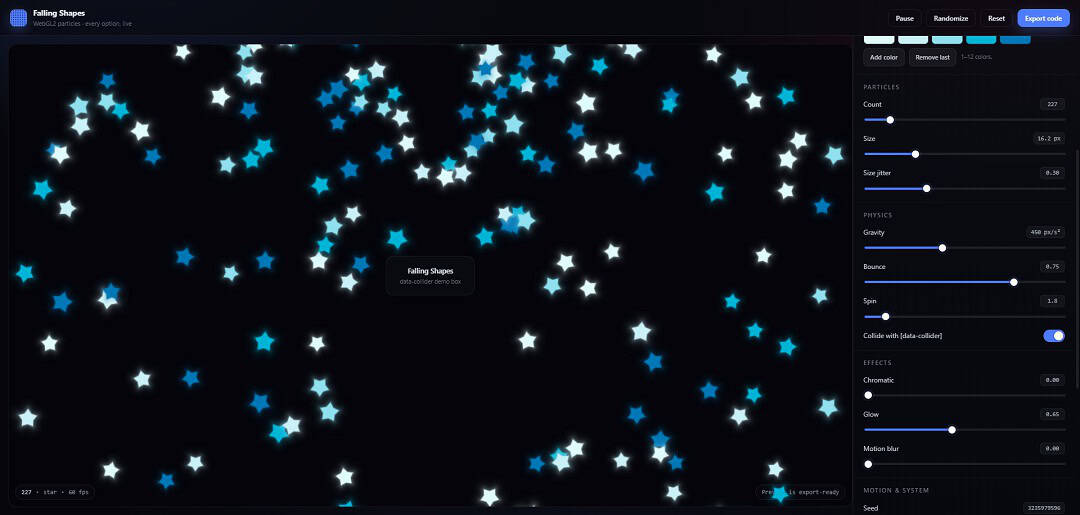
Delightful cascade of glowing shapes that rain down and bounce realistically around elements on your page. You can customize everything from the shape, colors, and speed to the physics, and it automatically pauses for users who prefer reduced motion.


Falling Particles Generator
Generator instructions: Simply copy one of the sections above and paste it into your website.
To create a new effect, use the generator, then click the Export code button and paste the code into the Supa Code Block element to replace the current effect.
To create a new effect, use the generator, then click the Export code button and paste the code into the Supa Code Block element to replace the current effect.
ONLY AVAILABLE FOR MEMBERS
Instructions
Open the JS script in the Supa Code Block element and edit the options at the end of the script. Each option is explained below:
Setup: the data-collider attribute
Before touching the options, one thing matters most: the particles know nothing about your layout until you mark it. The script doesn’t guess what’s a button and what’s a headline. Inside the container you pass as target, add the attribute data-collider to every element the shapes should physically bounce off:
The script then measures each of these elements’ bounding boxes and treats them as solid rectangles, with a small 4px padding around them so shapes don’t visually overlap the edges. Elements smaller than 2×2 px are ignored. Measurement happens automatically: on container resize, when a collider element itself resizes (each one gets its own ResizeObserver), and after web fonts finish loading — so a late font swap that reflows your headline won’t leave the hearts colliding with a box that no longer exists.
This only applies when collide: true. If you disable collisions, the attribute is simply ignored and shapes only bounce off the container’s own edges.
The options
target (first argument) A CSS selector string ('#hero') or a DOM element. The canvas is appended inside it and absolutely positioned to fill it; if the container is position: static, it’s quietly switched to relative. Returns an object with get(), set(), resize(), and destroy() — or a harmless stub if WebGL2 isn’t available, so you never need feature-detect on your side.
count — default 130 How many shapes exist at once. Rounded and clamped between 1 and 4000. Shapes that fall out the bottom are recycled back above the top edge, so the count is constant forever — it’s a population, not a one-shot burst.
shape — default 'star' One of: 'circle', 'square', 'triangle', 'diamond', 'hexagon', 'star', 'spark', 'ring', 'cross', 'heart'. Anything else silently falls back to 'star'. One shape per instance — every particle in the system shares it, since the shape is baked into the shader as a signed distance field.
size — default 12 Base radius in CSS pixels, clamped between 1 and 400. Treat it as the average size; sizeJitter spreads the actual sizes around it. Edges are anti-aliased per-pixel via the shader, so shapes stay crisp whether they’re 3 px or 400 px wide.
sizeJitter — default 0.5, range 0–1 Random size variation. 0 means every shape is exactly size. 1 means each shape lands somewhere between half and 1.5× the base size — with size: 33.5 and sizeJitter: 1, your hearts range from roughly 17 to 50 px. This is the “make it look organic, not like a grid of stickers” dial.
colors — default pastel palette An array of hex colors ('#e44ec9' — three-digit shorthand works too). Maximum 12 entries; anything beyond is sliced off. Each particle picks one at random on spawn. Invalid hex values fall back to white rather than crashing. With two colors, you get a roughly 50/50 split.
bounce — default 0.6, range 0–1 How much speed a shape keeps when it hits something. 0 means it lands and stops dead; 1 means it leaves as fast as it arrived. Your 0.3 is deliberately heavy — hearts drop onto the headline, settle, and stay put, which is also what makes the fade-out-when-stuck behavior relevant. The same value governs side-wall bounces and how sharply spin reverses on impact.
gravity — default 900, range −3000 to 6000 Downward acceleration in pixels per second². 400 is a gentle, drifty fall; the 900 default is a proper drop. Negative values make shapes float upward. Gravity also determines impact speed, which matters because collisions above ~140 px/s trigger the sideways nudge that shoves hearts off your buttons instead of letting them perch on top.
spin — default 1.2, range 0–20 Accepted and clamped as the rotation-speed setting — but note that in this version the per-particle tumble is randomized independently (each shape spins between about −1.8 and +1.8 rad/s), so changing this option doesn’t currently alter how fast hearts rotate. It’s wired into the config surface, kept for future use, but the tumble you see is random, not tuned by it.
chromatic — default 0, range 0–2 Chromatic aberration. At speed, shape edges split into pink and cyan fringes, like a cheap lens or VHS tape. The effect scales with velocity, so slowly drifting shapes stay clean and fast-moving ones fringe. 0 costs nothing at all — it’s fully skipped.
glow — default 0, range 0–1.5 A soft halo radiating outside each shape, fading exponentially with distance. One nice detail: the glow is gated to the outside of the shape only — the interior always stays exactly the brand color, never tinted by its own halo. 0 disables it entirely.
blur — default 0, range 0–1 Motion blur. Fast-moving shapes stretch slightly along their direction of travel and their edges soften proportionally to speed. At 0 everything is razor-crisp no matter how fast it falls. Useful when gravity is high and shapes start reading as strobing.
collide — default true Master switch for the data-collider system. true measures your marked elements and bounces shapes off them; false skips the measuring entirely and shapes only interact with the container walls. Toggling it via set() triggers a fresh measurement.
seed — default 0 An integer for the deterministic random generator (mulberry32). 0 means a fresh random layout on every load. Any other value locks everything down: same sizes, same colors, same positions, same fall pattern, every single time. Great for demos, screenshots, and A/B tests where the confetti must be identical across variants. Changing the seed at runtime rebuilds the whole population; other changes keep existing shapes and just retune them.
respectReducedMotion — default true When the visitor’s OS has “reduce motion” enabled (prefers-reduced-motion: reduce), the animation never starts. Instead, a static preview is rendered: shapes scattered naturally across the container, fully visible, none falling. If the OS setting changes mid-session, the page switches live between the two modes. Set it to false only if the falling is genuinely essential to the design — this one line is the difference between decoration and a vestibular trigger. (Independently of this, the animation also pauses whenever the tab is hidden.)
pixelRatio — default 2, range 1–3 The internal canvas resolution multiplier, capped by the device’s actual devicePixelRatio. 2 renders at double resolution so shapes are crisp on retina screens. Lower it toward 1 on low-end devices to trade a little edge softness for fill-rate headroom.